Is there a food scanner app for kidney disease and diabetes?
Yes. MedMenu's Scan checks a packaged food against the conditions you've told MedMenu about, and you can have several at once. Here's what you get after one scan:
- A star rating per condition, out of 5, so a pancake mix can rate 3 of 5 for your blood sugar and 2 of 5 for your kidneys on the same screen.
- The number behind each rating, per serving, next to how much room a single meal has for that nutrient.
- The guideline it was checked against, named on the screen, such as the 2024 international kidney disease guideline or the American Diabetes Association's 2026 Standards of Care.
- Over 460,000 US packaged foods from USDA FoodData Central label data. Loose produce works too: type the 4 or 5 digit number on the sticker.
- No app to install. It runs in your phone's browser on iPhone or Android, and you can type the barcode number if the camera won't cooperate.
What does scanning a barcode look like?
You're in the aisle holding a box of pancake mix, and the label is a wall of numbers that don't say anything about your kidneys or your blood sugar. Here's what the same moment looks like with MedMenu open, step by step.
-
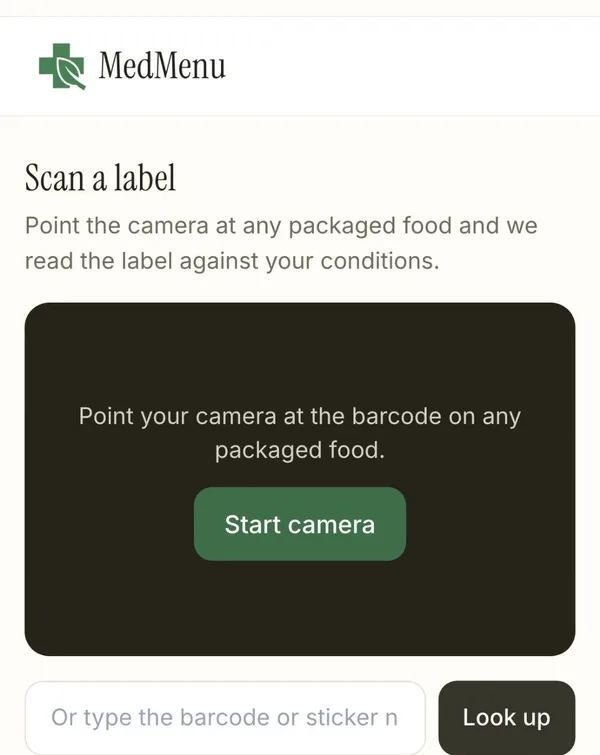
1. Point your phone at the barcode. Tap Start camera. No camera handy? Type the number under the barcode lines, or the 4-digit number on a produce sticker (4011 is bananas).
-
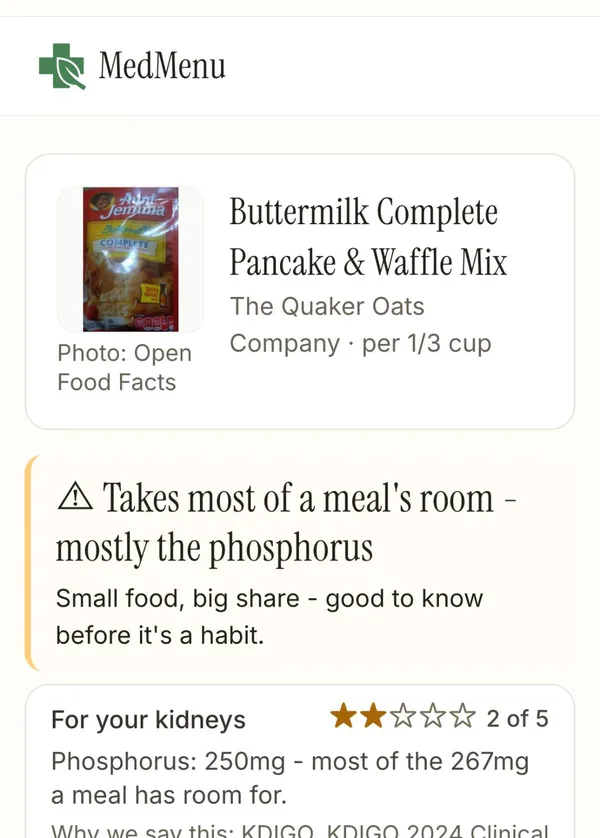
2. Read the answer in plain words. A third of a cup of this pancake mix carries 250 mg of phosphorus, most of the 267 mg one meal has room for on a kidney diet, so it gets 2 of 5 for your kidneys.
-
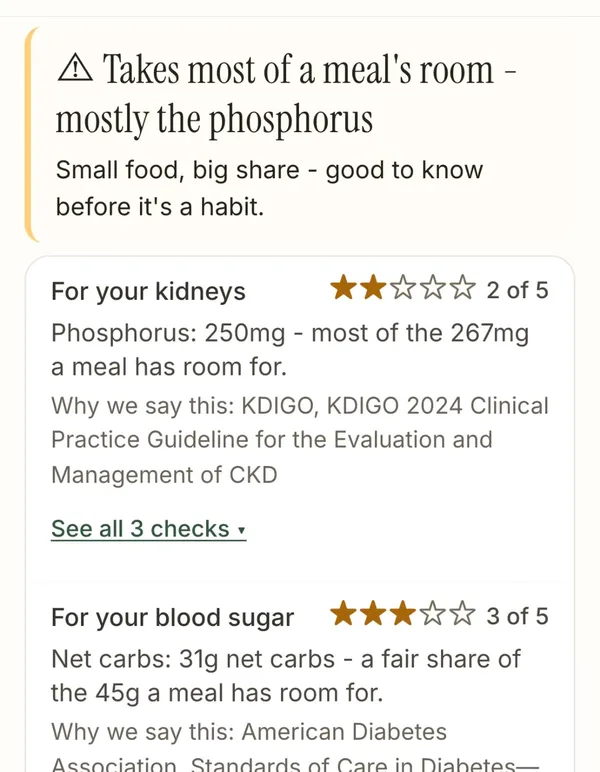
3. See every condition, with its source. For blood sugar it's 3 of 5: 31 g net carbs, a fair share of the 45 g a meal has room for. For blood pressure it's 2 of 5: 490 mg sodium against a meal's 500 mg.
Swipe to see each step
How does the scanner decide how a food fits?
It compares one serving with a meal's share of your daily limit. Most guidelines give limits per day, and a food you eat at lunch only gets part of that day. MedMenu splits each daily limit across three meals, so for kidney disease, where the guideline sets sodium under 2,000 mg a day, one meal has room for about 667 mg. For high blood pressure the American Heart Association's ideal is 1,500 mg a day, which leaves 500 mg a meal, the number you saw on the pancake mix.
The stars then follow how much of that meal's room one serving spends:
- 5 stars when a serving uses about a third of a meal's room or less.
- 2 stars when it uses most of a meal's room, like the pancake mix's phosphorus.
- 1 star when one serving goes over what a whole meal has room for.
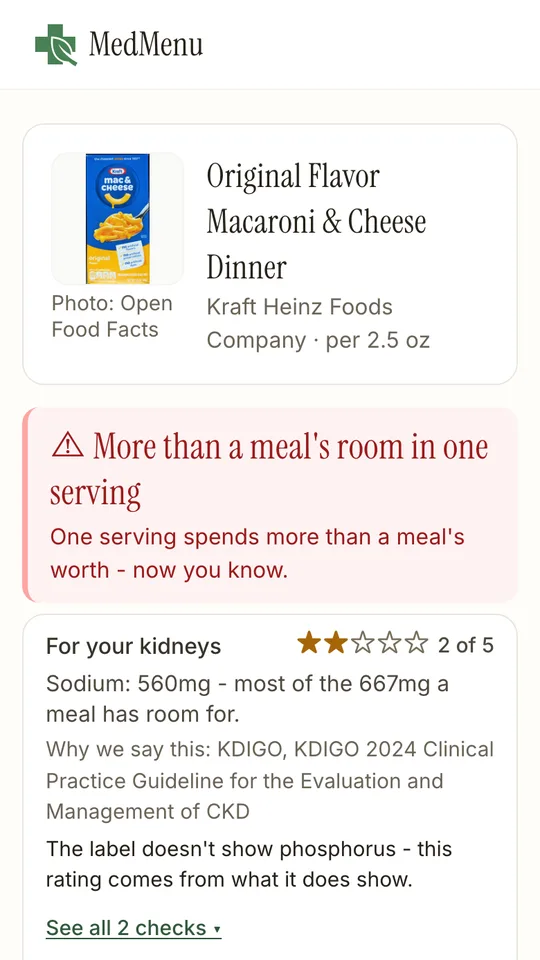
What gets checked depends on the condition. Kidney disease looks at sodium, potassium and phosphorus. Diabetes looks at net carbs and glycemic load. Heart disease looks at saturated fat and sodium, and celiac disease reads the ingredient list for wheat, barley and rye, including hidden barley words like malt extract. When a label is missing a number, the screen says so instead of guessing, as it does on this box of mac and cheese:
Can a food scanner find phosphate additives?
MedMenu's can, for anyone who has kidney disease in their profile. Most US nutrition labels leave phosphorus off, so added phosphate usually shows up only in the ingredient list, and it's easy to miss in small print. The scanner reads that list and flags names like these:
- Added phosphates: phosphoric acid, sodium phosphate, calcium phosphate, pyrophosphates, polyphosphates and sodium aluminum phosphate (common in baking mixes).
- Added potassium: potassium chloride (often in "lite" salt and low-sodium products), potassium lactate and potassium citrate.
- Anything else with "phos" in the name that it doesn't recognize gets a gentle flag, so a new additive name doesn't slip through.
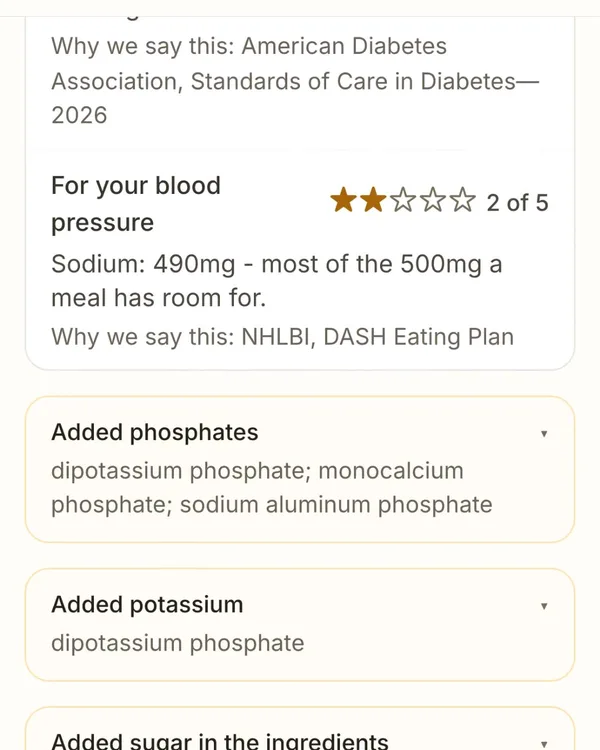
On the pancake mix, Scan found three phosphates in the ingredient list (dipotassium phosphate, monocalcium phosphate and sodium aluminum phosphate) and flagged dipotassium phosphate again as added potassium. It also lists the added sugars (sugar, corn syrup, dextrose) for diabetes, and baking soda as sodium beyond the salt.
Why bother? A 2025 review by phosphorus researchers Mona Calvo and Jaime Uribarri reports that phosphorus added during processing is absorbed at 80 to 100 percent, while the phosphorus found naturally in food is absorbed at 40 to 60 percent (Adv Nutr, 2025). Two foods with similar phosphorus on paper can land very differently.
How is this different from Yuka or Fooducate?
Yuka and Fooducate are popular, well-built scanners that give a general health score. Yuka's own help page says its food score is 60% nutritional quality (based on Nutri-Score), 30% additives and 10% organic. Fooducate grades foods and says it offers dietary recommendations for diabetes, high cholesterol and heart conditions. MedMenu's Scan is narrower on purpose: it rates the food separately for each of your conditions, against the limit your guideline sets.
| App | What the score means | Rated per condition | Kidney nutrients and additives |
|---|---|---|---|
| Yuka | One general score out of 100 for every user | No condition settings described on its site | Rates additives by general risk level |
| Fooducate | A letter grade for the quality of the food | Recommendations for diabetes, high cholesterol and heart conditions | Not described on its site |
| MedMenu Scan | Stars per condition, from one serving's share of a meal's room | Yes: kidney disease, diabetes, hypertension, heart disease, celiac, in any mix | Sodium, potassium and phosphorus, plus phosphate and potassium additive flags |
Yuka and Fooducate are described from their own public pages as of October 4, 2026. Either may change its features after this date.
How do I find recipes with the ingredients I already have?
Open Scan-and-Cook at the end of the day, when the question is "what can I make with what's here?" Photograph the food itself: set it out on the counter, or open the fridge and aim at the shelf so the chicken, vegetables and the rest are in view. MedMenu reads the food it can see in the photo. You can also just type a quick list. Then tap the recipe you want.
-
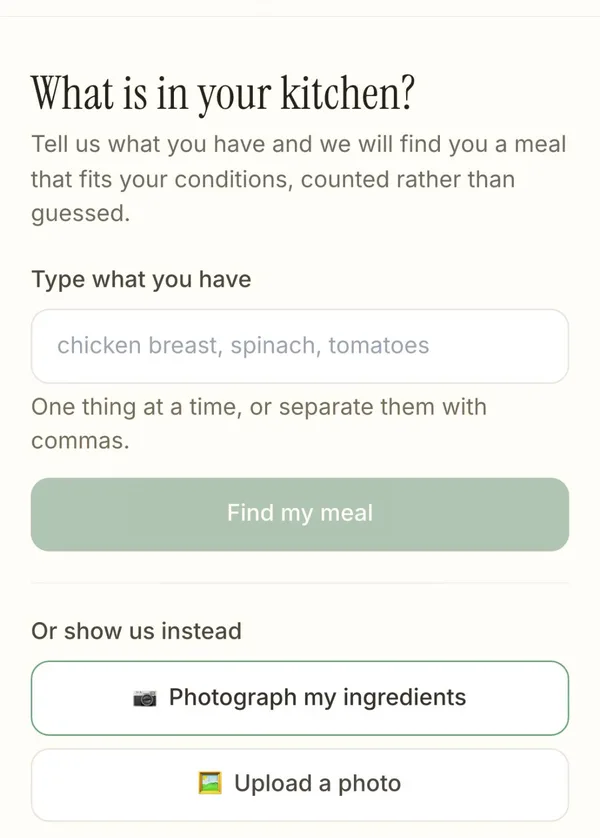
1. Snap or type. Type what you have, one thing at a time or separated with commas, or tap Photograph my ingredients. Photos are read and thrown away, never stored.
-
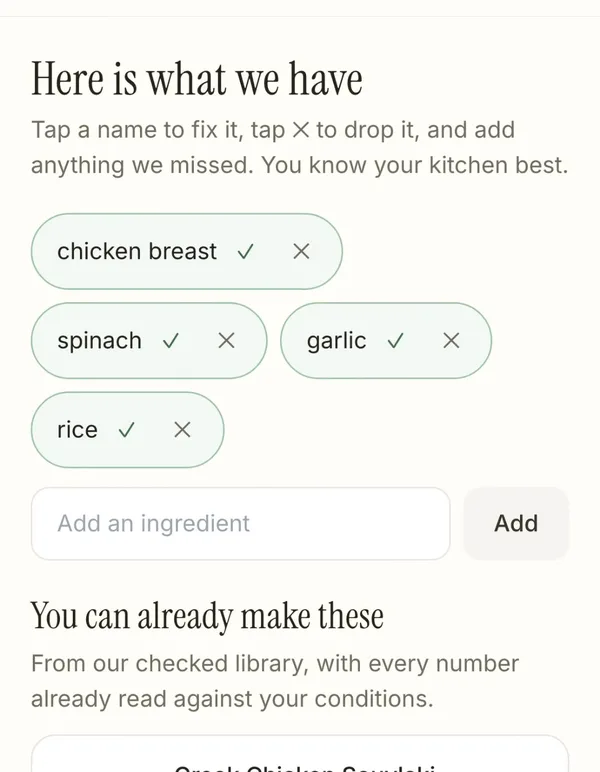
2. Fix the list, then see what you can make. Tap a name to correct it, tap × to drop it, add anything it missed. Recipes from MedMenu's checked library appear right under it.
-
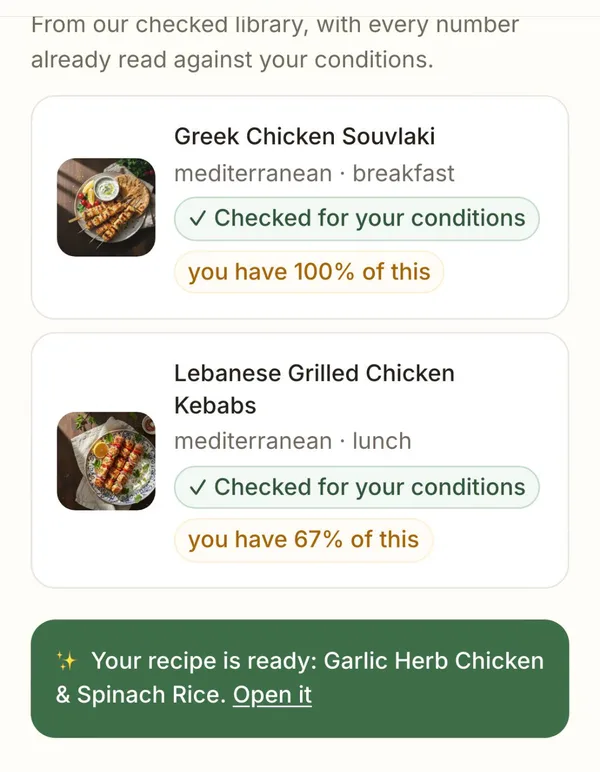
3. Pick one, or ask for something new. Each match shows how much of it you have on hand. Want something different? MedMenu writes a new recipe around your ingredients, here Garlic Herb Chicken & Spinach Rice.
Swipe to see each step
Will a recipe written from my ingredients fit my conditions?
MedMenu only shows you a written recipe after it fits every condition you manage. The recipe below was written for someone managing kidney disease, diabetes and high blood pressure together, so it had to fit all three at once.
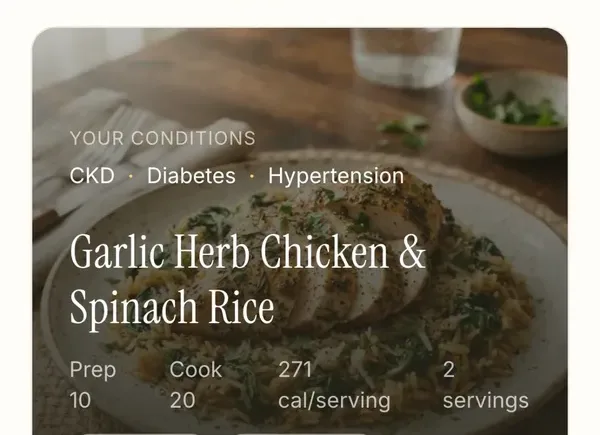
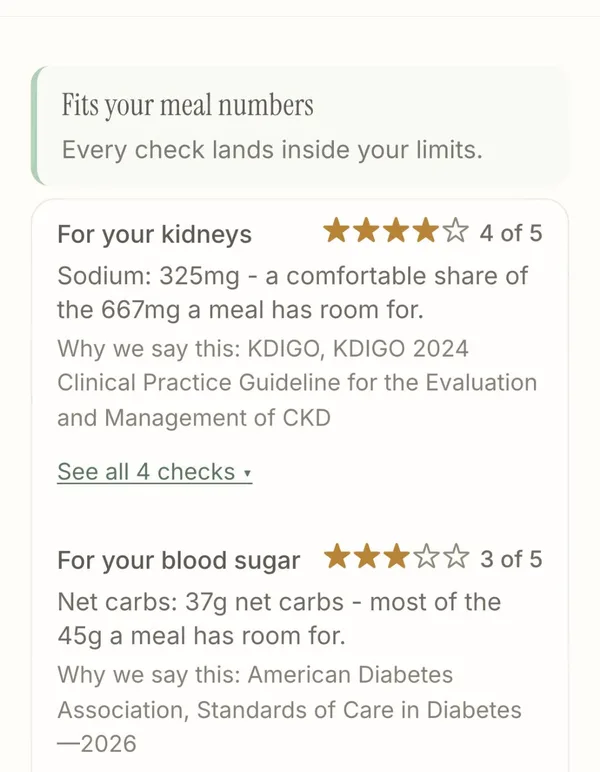
- The numbers come from USDA data. Each ingredient is matched to USDA FoodData Central and the nutrition is counted from there, per serving. If an ingredient has no USDA data yet, the card tells you which one.
- A recipe that misses gets rewritten. MedMenu tries again with the problem in mind, like a smaller portion of protein for a kidney diet.
- If nothing fits, it tells you why. You'll see the reason for each condition and an idea that usually helps, such as adding another vegetable. Those attempts don't count toward your monthly recipes.
- You can keep it. Save a written recipe and it sits in your Saved Recipes with the rest of your favorites.
What do Scan and Scan-and-Cook cost?
- Scan: free for every MedMenu member, on the free plan or Pro. You just need a free account so it knows your conditions.
- Scan-and-Cook matching: free, by photo or by typing. Free accounts see their matches from a set of 25 recipes, and matches from the full library are marked Pro.
- Written recipes: 3 a month on a free account. MedMenu Pro is $7.99 a month and raises that to 200 a month, along with the full recipe library.
Which one should you use, and when?
- Standing in the store holding a box or can? Use Scan. It answers "how does this fit me?" before it goes in the cart.
- Choosing between two brands of the same thing? Scan both. Sodium and phosphorus can differ a lot between brands of soup, broth, bread and frozen meals.
- Home at 6pm, fridge half full, no plan? Use Scan-and-Cook to see what you can already make.
- Want something new from what you bought? Ask Scan-and-Cook to write a recipe around it.
- Prefer to plan the whole week ahead? MedMenu's weekly planner and recipe library still do that, and the grocery list builds itself.
If you'd like to watch them first, there's a short video of each on the MedMenu videos page.
How we calculated these numbers
Packaged-food numbers come from the label data manufacturers report to USDA FoodData Central (Branded Foods), with Open Food Facts as a fallback for products USDA doesn't list yet. Recipe nutrition is counted from USDA FoodData Central ingredient data. Per-meal room is each daily limit in MedMenu's condition guidelines divided across three meals. Every screen on this page is a real MedMenu result, taken from MedMenu's own feature videos.
Sources
- · USDA FoodData Central (packaged-food label data and recipe nutrition)
- · KDIGO 2024 Clinical Practice Guideline for the Evaluation and Management of CKD (sodium under 2 g a day)
- · American Heart Association, How much sodium should I eat per day? (1,500 mg a day ideal limit)
- · Calvo MS, Uribarri J. Phosphorus. Adv Nutr. 2025 (absorption of added vs natural phosphorus)
- · Yuka: How are food products rated? (fetched October 2026)
- · Fooducate (feature description, fetched October 2026)
Not medical advice. MedMenu is an information tool that shows how foods and recipes line up with published dietary guidelines. Talk with your doctor or dietitian about the limits that are right for you, especially if you are on dialysis or your care team has set your own targets. Published October 4, 2026 · Last updated October 4, 2026.